How Many Tesla Powerwalls Do I Need to Power My Home?

How many Powerwalls are needed for a Florida home?

Last updated: August 2026

📌 Key Points

  • Quick answer: One Powerwall 3 is often enough for essentials-only backup. Whole-home backup commonly requires 27 to 40.5 kWh of total storage or more, depending on household loads and solar recharge. Try our free Powerwall Calculator.
  • Know your daily number: Divide the kWh shown on your monthly electric bill by 30 to estimate daily consumption. Florida residential customers average approximately 36 kWh per day based on the latest complete statewide data.
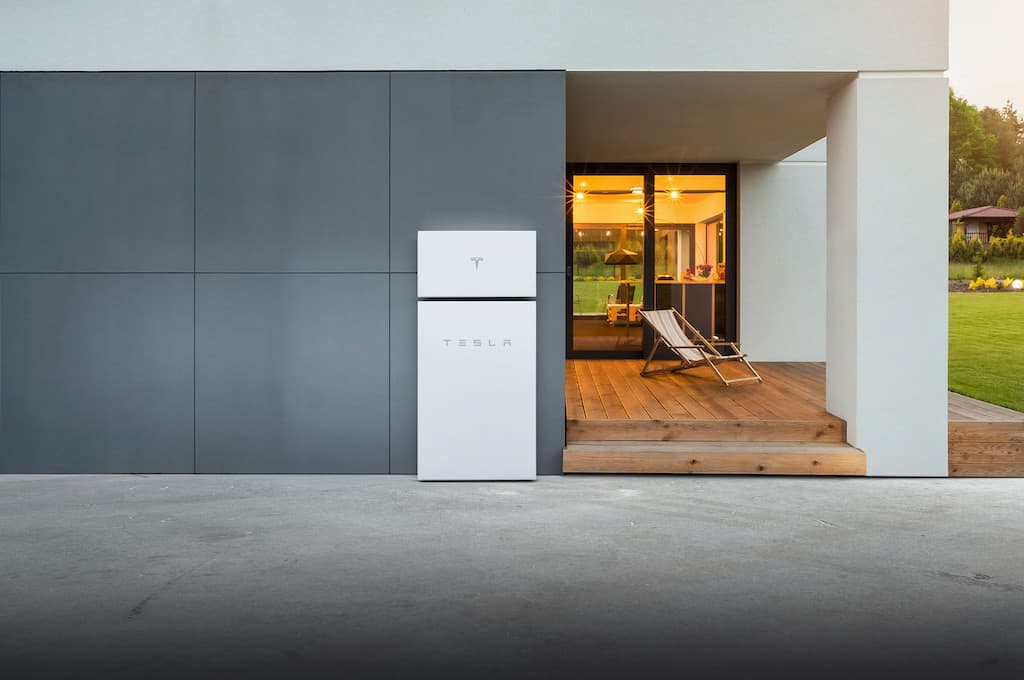
  • One unit provides substantial output: A Powerwall 3 stores 13.5 kWh, delivers 11.5 kW of continuous power, and can start many central air-conditioning systems when the equipment’s starting-current requirements are compatible with the battery design.
  • Expansion units extend runtime: Each Powerwall 3 Expansion adds 13.5 kWh of storage while relying on the lead Powerwall’s inverter. Tesla supports up to three Expansion units in a compatible system.
  • Power vs. energy: Each additional full Powerwall adds both output power and stored energy. Expansion units add energy capacity without increasing the system’s output.
  • Storm preparation: Storm Watch can automatically prioritize charging when Tesla detects a qualifying severe-weather event in your area.
  • 2026 pricing: Our typical Florida installations range from $14,000 to $16,500 for the first fully installed Powerwall 3, with the cost per kWh decreasing considerably with each additional battery or expansion unit.

One Powerwall 3 is often enough for essentials-only backup, while whole-home backup commonly requires 27 to 40.5 kWh of total storage or more. The right configuration depends on how much energy your home uses, which appliances you want to run during an outage, and how much solar energy is available to recharge the batteries each day.

If you are considering installing a Powerwall, the exact number comes down to three questions: How much energy does your home use? What do you want to keep running when the grid is down? How quickly can your solar panels recharge the system? If you are new to energy storage, start with our guide to how home batteries work, then use the steps below to estimate your needs.

How Much Energy Does Your Home Use Each Day?

Start with your electric bills. Divide your monthly kWh by 30 to estimate your average daily consumption. This is one of the most important numbers in the sizing process.

Based on the latest complete state electricity data from the U.S. Energy Information Administration, Florida residential customers used approximately 36 kWh per day on average in 2024. That is higher than the national residential average and reflects Florida’s heavy reliance on electricity for air conditioning and other household loads. Your own usage may be much higher or lower, and it will often peak during the hottest summer months.

The following figures are general planning estimates. Equipment age, efficiency, thermostat settings, household behavior, and daily runtime can materially change actual consumption. Your equipment labels and monitoring data provide better inputs for a final design.

Load Typical Power Draw Typical Daily Energy
Central AC (3 to 4 ton) Approximately 3 to 5 kW while running Approximately 15 to 30 kWh in hot weather
Electric water heater Approximately 4.5 kW while heating Approximately 6 to 10 kWh
Pool pump Approximately 0.5 to 2.5 kW, depending on pump type and speed Approximately 3 to 15 kWh, depending on efficiency and runtime
EV charger (Level 2) Approximately 7 to 11 kW Approximately 10 to 15 kWh for typical daily driving
Refrigerator Approximately 0.1 to 0.2 kW averaged over time Approximately 1 to 2 kWh
Lights, Wi-Fi, and device charging Often under 0.5 kW combined Approximately 1 to 2 kWh

How Much Power Does One Powerwall 3 Provide?

According to the official Powerwall 3 datasheet, a single unit stores 13.5 kWh of energy, delivers 11.5 kW of continuous power, and provides a 185 LRA motor-start rating. That is enough to support substantial household loads, but central-air compatibility must still be verified using the compressor’s nameplate starting-current requirements and the home’s other simultaneous loads.

Power and energy measure different things:

  • Power, measured in kW: How much equipment the battery can operate at the same time.
  • Energy, measured in kWh: How long the battery can continue operating those loads.

One Powerwall 3 may provide enough output for the simultaneous loads in many homes. What one unit often lacks is enough stored energy to operate an average Florida home normally through a long outage.

What Are Powerwall 3 Expansion Units?

Powerwall 3 Expansion units provide a cost-effective way to add storage when the system already has enough output. Each Expansion unit adds 13.5 kWh of energy capacity but does not include another inverter. It relies on the lead Powerwall 3 for power conversion.

Tesla supports up to four full Powerwall 3 units and three Expansion units in a compatible system, for up to seven total units. Expansion units must connect to the lead Powerwall.

The rule of thumb: Add Expansion units when the system already provides enough output power but needs more runtime. Add full Powerwalls when the home needs both more runtime and additional output for simultaneous loads.

How Many Powerwalls Do You Need?

Match the configuration to what you want to protect and how long you want it to operate. The following examples assume the batteries begin near full charge and receive no solar energy during the estimated runtime. Daily solar recharge can extend backup, but the amount depends on the array, weather, shading, daytime household consumption, and battery charge limits.

Backup Goal Planning Load Example Configuration Estimated Runtime Without Sun
Essentials only, such as refrigeration, lights, Wi-Fi, fans, and device charging Approximately 5 to 8 kWh per day 1 Powerwall 3, 13.5 kWh nominal Roughly 1 to 2 days, depending on backup reserve, losses, and actual consumption
Average Florida whole-home usage Approximately 35 to 40 kWh per day 1 Powerwall 3 plus 2 Expansion units, 40.5 kWh nominal Less than or approximately 1 day under normal whole-home consumption
Large whole home with multiple major loads Approximately 45 to 60 kWh per day 2 Powerwall 3 units plus 2 to 3 Expansion units, 54 to 67.5 kWh nominal Roughly 1 day, with the exact result determined by load management

These are planning estimates, not guaranteed runtimes. Actual performance depends on state of charge, backup reserve, conversion losses, weather, solar-array output, equipment efficiency, temperature, and how household loads are managed during the outage.

In the large-home example, the second full Powerwall adds both energy and output, increasing continuous power from 11.5 kW to 23 kW before other design limitations are considered. That additional output can matter when the home needs to operate multiple air conditioners, pumps, or other major loads at the same time.

Can Your Solar Array Recharge the Powerwalls Each Day?

Battery capacity is only one side of extended-outage planning. The solar array must also produce enough daytime energy to power the home and replace the energy used from the batteries overnight.

For example, a household that uses 20 kWh overnight needs more than 20 kWh of solar production the following day. The panels must also serve daytime loads and account for normal system losses. A larger battery bank does not correct an undersized solar array. It only stores more energy when enough energy is available to charge it.

Your installer should compare the home’s hourly consumption with the solar system’s expected monthly production, not simply compare battery capacity with the monthly electric bill. The analysis should account for roof orientation, shading, seasonal production, daytime loads, and the reduced sunlight that can accompany tropical weather.

A Worked Example: Sizing a Hypothetical 2,200-Square-Foot Tampa Home

Consider a hypothetical family in a 2,200-square-foot Tampa-area home that used 13,800 kWh over the previous twelve months. That equals 1,150 kWh per month, or about 38 kWh per day, with higher consumption during the hottest summer months.

The family’s essential loads use approximately 6 kWh per day: refrigeration, lighting, Wi-Fi, device charging, ceiling fans, and a garage freezer. One Powerwall 3 could support that reduced load for roughly 1.5 to 2 days on storage alone, depending on the selected backup reserve and normal system losses. Sufficient daily solar production could extend that period.

For normal whole-home operation, including a 4-ton air conditioner, the household may use approximately 38 to 48 kWh per day. One Powerwall 3 with two Expansion units would provide 40.5 kWh of nominal storage behind 11.5 kW of continuous output.

Whether that configuration can support the home through consecutive outage days depends on the air conditioner’s starting requirements, simultaneous loads, and the solar array’s actual production. The system designer must model how much solar remains available for battery recharge after daytime household consumption, especially during cloudy hurricane conditions. Prioritizing essential circuits would materially extend the available backup duration.

Can Smarter Load Management Reduce the Number of Batteries You Need?

Yes. What the battery backs up can matter as much as how much storage you purchase.

A critical-loads panel can place refrigeration, lighting, communications, selected outlets, and other priority circuits on a protected subpanel. Powerwall 3 also supports installer-configured load shedding, which can automatically disconnect a compatible controlled load when the system goes off-grid. A smart electrical panel may provide more granular circuit-level control, depending on the equipment and system design.

In some homes, thoughtful load selection can reduce the amount of battery capacity needed while still protecting the circuits that matter most. In others, whole-home backup remains the better design because it provides greater flexibility during short outages. The correct approach depends on the homeowner’s priorities and the electrical layout.

How Does Storm Watch Help During Hurricane Season?

For many Florida homeowners, Storm Watch is one of Powerwall’s most valuable resilience features. When Tesla detects a qualifying severe-weather watch or warning for the system’s location, Storm Watch can automatically prioritize charging Powerwall to its maximum available capacity using solar or grid power while the grid remains available.

Homeowners can choose a normal backup reserve that reflects their resilience goals and utility rate plan. Storm Watch can temporarily prioritize a full charge when qualifying severe weather is detected. The homeowner receives an app notification and can monitor the system’s status.

Storm Watch does not eliminate the need to size for cloudy conditions. Heavy cloud cover surrounding a tropical system can reduce solar production. Homeowners planning to maintain whole-home comfort through a long hurricane outage should size conservatively, manage major loads, and charge vehicles before the storm arrives.

What About EV Charging?

Plan for EV charging carefully during an extended outage. A typical EV battery can store several times more energy than one Powerwall, and Level 2 charging can consume much of a single Powerwall’s available output.

For maximum home-backup duration, charge the vehicle before severe weather and minimize routine EV charging while the grid is down. Compatible Tesla systems can coordinate vehicle charging during an outage, slowing or stopping the vehicle when household loads increase, or Powerwall reaches the owner’s selected energy threshold. Every kilowatt-hour sent to the vehicle is a kilowatt-hour no longer available to support the home.

If EV charging is a firm requirement during an outage, the battery bank, solar array, electrical service, charging equipment, and household loads should be designed around that goal from the beginning.

Powerwall Backup Calculator

Battery backup planner

How many Powerwalls does your home need?

Answer a few questions about your home and what you want to keep running when the grid goes down. Takes about a minute.

1 of 3

$ / month

A typical Florida home runs $150 to $250 a month. Grab a recent bill if you have one handy.

Do you have solar panels?
How many central AC units cool your home?
Size of your main AC unit

How Much Does a Powerwall 3 Cost in 2026?

Based on SunVena’s typical Florida project pricing as of August 2026, homeowners may expect approximately $14,000 to $16,500 for the first fully installed Powerwall 3. Actual pricing depends on the home’s electrical equipment, backup configuration, permitting requirements, site conditions, gateway hardware, and whether the battery is installed with new or existing solar.

Additional capacity generally costs less per kilowatt-hour because some design, permitting, gateway, and installation costs are shared. Ask for an itemized proposal showing the cost of each full Powerwall, each Expansion unit, electrical upgrades, permitting, and other project-specific work.

Configuration Capacity Cash Price Added Cost Average Cost per kWh
1 Powerwall 3 13.5 kWh $14,250 N/A $1,056
2 Powerwall 3 units 27 kWh $24,450 $10,200 $906
2 Powerwall 3 + 1 Expansion 40.5 kWh $31,258 $6,808 $772
2 Powerwall 3 + 2 Expansions 54 kWh $38,380 $7,122 $711

Pricing reflects SunVena’s typical Florida project range as of August 2026 and is subject to change. It is not a guaranteed quote.

One important change from previous years is that the federal Residential Clean Energy Credit is not available for homeowner battery installations completed after December 31, 2025. The IRS instructs homeowners to claim the credit for the year in which qualifying property is installed, not merely purchased.

Some third-party-owned solar-and-storage arrangements may reflect separate tax incentives available to an eligible system owner. The amount, eligibility, and customer benefit depend on the provider, project, contract terms, and current tax rules. Homeowners should compare total payments, escalators, buyout provisions, warranties, and ownership terms rather than assuming a particular tax benefit will be passed through.

Powerwall Sizing FAQs

Can one Powerwall 3 run a whole house?

It may provide enough output for many homes, but not every home. Its 11.5 kW of continuous output can support substantial simultaneous loads, and its motor-start capability may support a compatible central air conditioner. The final answer depends on compressor starting current, electric water heating, pumps, cooking appliances, EV charging, and other loads operating at the same time. Even when output is sufficient, 13.5 kWh of stored energy may provide only several hours of normal whole-home operation.

How long will two Powerwalls last in an outage?

Two full Powerwall 3 units provide 27 kWh of nominal storage. That may support a carefully managed essentials load for roughly three to four days, or an average Florida home’s normal usage for approximately 14 to 18 hours. Solar recharge can extend either estimate, while high consumption, reserve settings, and conversion losses can shorten it.

Do Expansion units increase Powerwall output?

No. Each Powerwall 3 Expansion adds 13.5 kWh of storage capacity, but it does not contain another inverter. Expansion units extend backup duration while relying on the lead Powerwall 3’s available output. Adding another full Powerwall 3 increases both stored energy and output, subject to electrical and system-design limitations.

What happens if the battery runs empty during an outage?

The system shuts down before the battery is damaged. In a solar-plus-Powerwall system, it may attempt to restart and recharge after sufficient sunlight returns, depending on system configuration and available solar production. Reducing consumption to essential loads early in an outage is one of the best ways to avoid reaching the shutdown threshold. For more on battery aging and service life, see our guide to how long home backup batteries last.

Can a Powerwall charge from the grid?

Yes, when the grid is available and the system’s settings, operating mode, and utility rules allow it. Storm Watch may charge the battery from the grid before qualifying severe weather. During a typical grid outage, the home’s solar system is the primary on-site source available to recharge Powerwall.

Is Tesla Powerwall the best battery for every home?

No. SunVena installs both Tesla Powerwall and Enphase battery systems. Powerwall 3 can be a strong fit for homeowners who need high output and substantial storage, while Enphase’s modular architecture may be attractive for certain existing Enphase solar systems or homeowners who want to add capacity in smaller increments. The best option depends on the existing solar equipment, backup goals, electrical design, budget, and desired expandability.

How Do You Get an Accurate Powerwall Recommendation?

For most Florida homes, one Powerwall 3 is a reasonable starting point for essentials-only backup. Whole-home resilience often requires two to three 13.5 kWh battery modules of total capacity, and some homes need more output or energy.

The fastest way to size the system correctly is to review twelve months of electric bills, identify the circuits that must remain available, verify the starting requirements of major equipment, and model the solar array’s ability to recharge the batteries during different seasons and weather conditions.

Contact SunVena for a home battery backup consultation. Our team can evaluate your usage, existing solar system, electrical equipment, and outage goals before recommending a configuration.